
Overview
WorldEmblem's API is a JSON-based REST API with OAuth2. All requests are made to endpoints beginning:
Production: https://we.azure-api.net/v3/Test: https://we.azure-api.net/v3-test/All requests must be secure, i.e. https, not http.
Developer Agreement
By using WorldEmblem's API, you agree to our terms of service.
Authentication
New (to API) Customers
Prior to using the API, please contact your Client Services or Sales Representative to request API access for your company. Once that has been enabled, you will be able to create an account and subscribe to the APIs you wish to use.
Authentication Keys
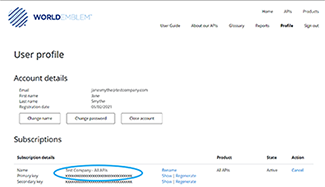
All access to the WorldEmblem API requires authentication. To do so, you will need to use the Authentication Keys assigned to you. You can find those in your Profile → User Profile → Subscriptions
An HTTP header called "Ocp-Apim-Subscription-Key" must be provided with each request. The value for the header should be the API key that you just generated.
Testing
Test: https://we.azure-api.net/v3-test/Basic Testing
Create Decorate CSG Order- create your own JSON or use the file linked at the right.Use Postman to call the API with the JSON from step 1.
POST https://we.azure-api.net/v3-test/decorate-csg-order
Be sure to add the required headers, including your API key, and the full JSON body when calling the API
You'll get a Response back with a status code. For help understanding the returned values, look at the API Details page. A successfully placed order will return Response 200, and this will include a
Customer Supplied Goods IDwhich you will need to store and use to pull the order's current status, status history, full order details, update the order, and more. A failure will return Response 400.
Create Decorate CSG Order Test JSON File
This file matches the example shown on this page for Create Decorate CSG Order.
Resources
The API is RESTful and arranged around resources. All requests must be made with an Ocp-Apim-Subscription-Keyusing https.
Resources are availaible to retrieve the options available when you create orders; to create, update, or get status on orders; to retrieve invoices; and to retrieve inventory.
Options
GET Get CSG Placements
Returns a list of locations on a garment, by garment type, where embroidery and other decorations can be placed
GET Get Lettering Colors
Returns a list of colors available for lettering orders
GET Get Lettering Fonts
Returns a list of fonts available for lettering orders
GET Get Notification Types
Returns a list of push notifications that can be returned for each order
GET Get Shipping Methods
Returns a list of the valid shipping carriers and options
POST Search Designs
Returns a list of designs stored in the WorldEmblem design library for the account number that made the POST
Orders
PUT Cancel CSG Order
Cancels an existing CSG Order, if the production process has not yet started (i.e. Garments have not yet been received)
POST Create Decorate CSG Order
Creates a CSG (Customer Supplied Goods) Order
POST Create Order
Creates a non-CSG order
GET Get CSG Inbound Shipping Label
Get a shipping label to use for inbound garments or decorations for a CSG Order. Shows the address, order number, etc. for faster handling upon receipt
GET Get CSG Order
Returns the details of a CSG Order
GET Get Order Status
Returns the complete history of an order
GET Get Order Status List
Returns a list of all orders and their current status
PUT Update CSG Order
Update an existing CSG order (available prior to the start of the production process only)
POST Set Notification Auth
Set the URL to which push notifications will be sent for an order
Invoices
GET Get Invoice
Returns a full invoice
GET Get Invoice Search Options
Returns a list of invoice search options
GET Get Invoices
Returns a list of invoices
Inventory
GET Get Inventory
Get your current inventory list
GET Get Inventory Item
Get the details of an inventory item
POST Set Inventory Threshold
Set the quantity at which you wish to be notified to restock
Example - Create Decorate CSG Order
POST Create Decorate CSG Order
This call creates a new CSG (Customer Supplied Goods) Order. The JSON for this is long and complex, so let's break it down.
This single example JSON payload creates two split orders. It's being submitted by a sports organization, and will send shirts and pants to a group of referees on one split order, and shirts to some coaches on the other split order.
POST https://we.azure-api.net/v3/decorate-csg-order
NAVAccountNumber
Please contact your Client Services Representative if you do not know your NAV Account Number.
Requestor & CreatedBy
The name and email included here will be shown on the order for WorldEmblem Operators and Staff.
ClientReferenceNumber, ExternalOrderNumber & CustomerNotes
These are optional and can be used as needed.
Recommendations for the Extra Info fields:
ClientReferenceNumber - A unique identifier for this client
ExternalOrderNumber - The order number in your system for this order
CustomerNotes - Notes you wish to share with the WorldEmblem Operator. All specific Order related data must be in the specified fields below, regardless of what is in the CustomerNotes field.
{
    "NavAccountNumber": "412436",
"Requestor": "Susan Jones",
"CreatedBy": "susan.jones@vballassoc.com",
"ClientReferenceNumber": "X375KDH918-A",
"ExternalOrderNumber": "3249726380",
"CustomerNotes": "URGENT",
OrderFiles
This optional section falls next, and allows you to provide pdf files that apply to the entire order.
fileType
OrderFile is the only option
url
This is the URL from which we can download the file.
fileName
The name of the file, not including the extension. i.e. "MyFile" not "MyFile.pdf".
contentType
Only PDF files are allowed, so please use application/pdf
description
Optional; share a description of your file. This is shown to WE Operators and Staff.
fileSource
Optional; share the source of your file.
extension
Please indicate the three character file extension here; must be pdf.
Id
Each file must be given an integer ID, and it must be unique among files on this order.
"OrderFiles": [
{
"fileType": "OrderFile",
"url": "https://we.developer.azure-api.net/content/X375KDH918-A_work_order.pdf",
"fileName": "X375KDH918-A_work_order",
"contentType": "application/pdf",
"description": "Work Order",
"fileSource": null,
"extension": "pdf",
"Id": 99901
}
],
GarmentGroups
This section falls next, and is where you tell us all about the garments you want decorated. GarmentGroups are structured into GroupingIDs. A GroupingID (you can think of it like a line item) must all be the same ItemType, Size, Color and StyleCode; all items within the GroupingID get the same decorations and are shipped to the same shipping address. To change any of those attributes, you must create a new GroupingID.
GroupingId
Always start with 1, and if you add more lines, increment the GroupingId each time.
Quantity
In this example, that's 15 Extra Small White SS Wicking Performance Polo Shirts.
ItemType/Name
We have a list of standard ItemType/Name options from which to pick. If your item is not on the list, you may use CUSTOM, but it is preferred that you use a listed ItemType/Name choice if possible.
Size & Color
Each unique size and color combination should result in a new garment group being created, so that the garments can be correctly identified when received.
StyleCode
The Brand and/or Style Number of the Garment you're shipping to us.
Description
Visible to WorldEmblem Operators and Staff; this should help the Operator properly identify the garment when unboxing and preparing them for decoration.
RequestedShipmentDate
The date by which you want your garments to be shipped. This date will be honored where possible, but is not a guarantee and does not trigger Rush processing.
"GarmentGroups": [
    {
     "GroupingId": 1,
     "Quantity": 15,
     "ItemType": {
      "name": "Shirt"
     },
     "Size": "XS",
     "Color": "White",
     "StyleCode": "SSWP",
     "Description": "SS Wicking Performance Polo",
     "RequestedShipmentDate": null,
GarmentFiles
In this section, you'll share all the files to be used for this garment group.
fileType
Choices are:
StitchFile - DST files for stitched designs, which may or may not have supplemental files (EMB files to define the threads to be used for a stitched design)
StitchFileImage - PNG files for images of the stitching to be completed.
TagFile - PDF files for garment tags to be printed and applied
LabelFile - PDF files for adhesive labels to be printed and applied
url
This is the URL from which we can download the file.
fileName
The name of the file, not including the extension. i.e. "MyDST" not "MyDST.dst".
supplementalFileURL/supplementalFileExtension
This is valid only for StitchFiles. If you wish to share the thread details via emb file, please provide the URL to that emb file and indicate "emb" as the extension. (Thread can also simply be listed directly in the JSON; an example will be shown further down.)
contentType
Choices are:
StitchFile - application/octet-stream
StitchFileImage - image/png
TagFile - application/pdf
LabelFile - application/pdf
description
Optional; share a description of your file.
fileSource
Optional; share the source of your file.
extension
Please indicate the three character file extension here.
Id
Each file must be given an integer ID, and it must be unique among files on this order.
     "GarmentFiles": [
      {
       "Id": 70101,
       "FileType": "TagFile",
       "Url": "https://we.developer.azure-api.net/content/RefTag.pdf",
       "FileName": "RefTag",
       "ContentType": "application/pdf",
       "Extension": "pdf",
       "Description": "Official Ref Shirt"
      },
      {
       "Id": 70102,
       "FileType": "StitchFile",
       "Url": "https://we.developer.azure-api.net/content/filledvolleyball.DST",
       "FileName": "filledvolleyball",
       "ContentType": "application/octet-stream",
       "Extension": "dst",
       "Description": "flat filled volleyball on sleeve"
      },
      {
       "Id": 70103,
       "FileType": "StitchFileImage",
       "Url": "https://we.developer.azure-api.net/content/rendered-filledvolleyball.PNG",
       "FileName": "rendered-filledvolleyball",
       "ContentType": "image/png",
       "Extension": "png",
       "Description": "flat filled volleyball on sleeve"
      }
     ],
Operations
operationType: Tag
For tagging a garment.
Category
Either "Upload Tag (PDF File) or "Customer Supplied Tag"
ItemDescription
This will be visible to the operator; please provide a helpful description
FileIDs
List the IDs this operation references from the GarmentFiles section
"Operations": [
      {
       "OperationType": "Tag",
       "Category": "Upload Tag (PDF File)",
       "ItemDescription": "Square Tag",
       "Comments": "Print & Apply to Garment Tag at Shirt Collar",
       "FileIds": [
        70101
       ]
      },
{
"OperationType": "Tag",
"Category": "Customer Supplied Tag",
"ItemDescription": "Volleyball Association Tag",
"Comments": "Apply to Right Sleeve",
"FileIds": []
}, operationType: CustomerSuppliedDecoration
Use this to indicate an application only operation.
Placement
Provide the correct placement name and/or code from the list of placements available. Note: The placement must match the Garment Item Type. Mismatches will result in your order being rejected due to a validation failure.
EmbellishmentMethod
Required if you include a CustomerSuppliedDecoration operationType. Choices are StitchOnly, HeatTransferOnly, StitchAndHeatTransfer
ItemDescription
This will be visible to the operator; please provide a helpful description
      {
       "OperationType": "CustomerSuppliedDecoration",
       "Placement": {
        "name": "101-Shirt-Left Chest (Std size 4\"w x 2\"h)",
        "code": "101"
       },
       "EmbellishmentMethod": "StitchAndHeatTransfer",
       "ItemDescription": "Certified Referee Patch - 4\" round",
       "Comments": "White Patch with Navy embroidery"
      },
operationType: DstFileDecoration
Use this for direct embroidery orders where you will provide a ready-to-stitch DST file.
Placement
Provide the correct placement name and/or code from the list of placements available. Note: The placement must match the Garment Item Type. Mismatches will result in your order being rejected due to a validation failure.
ItemDescription
This will be visible to the operator; please provide a helpful description
FileID
List the IDs this operation references from the GarmentFiles section
DesignDetail
This section will collect the thread color and needle sequence information. This section is required if you are submitting a .dst file with your order.
Type
ThreadColor indicates that you'll be listing the threads directly in the JSON. If you've provided a supplemental file, use "Colorway" here.
SubType
Thread Brand
SourceCode
Thread Color Code from the Manufacturer
Description
Optional; Thread Color Description
Order
The Needle Sequence
This data repeats as necessary to describe all of the needles in the design. Be sure to close the last one with a square bracket.
      {
       "OperationType": "DstFileDecoration",
       "Placement": {
          "name": "110-Shirt-Right Sleeve (Std size 3\"w x 1.5\"h)",
          "code": "110"
         },
       "ItemDescription": "Filled Volleyball for right sleeve",
       "Comments": "Goes on Right Sleeve",
       "FileIds": [
        70102
       ],
       "Design": {
          "DesignDetail": [
             {
                "Type": "ThreadColor",
                "SubType": "Madeira",
                "Order": 1,
                "SourceCode": "1743",
                "Description": "Polyneon - Oxford Blue"
             }
          ]
       }
      }
Closing the Operations section
Closing GroupingID 1
     ]
    },
GroupingID 2
This GroupingID is nearly the same as GroupingID 1; the differences are size and quantity.
    {
     "GroupingId": 2,
     "Quantity": 20,
     "ItemType": {
      "name": "Shirt"
     },
     "Size": "S",
     "Color": "White",
     "StyleCode": "SSWP",
     "Description": "SS Wicking Performance Polo",
GarmentFiles
Note that while the files and the information about them is identical to the files in GroupingID 1, the IDs are unique.
     "GarmentFiles": [
      {
       "Id": 70201,
       "FileType": "TagFile",
       "Url": "https://we.developer.azure-api.net/content/RefTag.pdf",
       "FileName": "RefTag",
       "ContentType": "application/pdf",
       "Extension": "pdf",
       "Description": "Official Ref Shirt"
      },
      {
       "Id": 70202,
       "FileType": "StitchFile",
       "Url": "https://we.developer.azure-api.net/content/filledvolleyball.DST",
       "FileName": "filledvolleyball",
       "ContentType": "application/octet-stream",
       "Extension": "dst",
       "Description": "flat filled volleyball on sleeve"
      },
      {
       "Id": 70203,
       "FileType": "StitchFileImage",
       "Url": "https://we.developer.azure-api.net/content/rendered-filledvolleyball.PNG",
       "FileName": "rendered-filledvolleyball",
       "ContentType": "image/png",
       "Extension": "png",
       "Description": "flat filled volleyball on sleeve"
      }
     ],
Operations
The Operations on GroupingID 2 are the same as those for GroupingID 1; however, they refer to the updated FileIDs specific to GroupingID 2.
"Operations": [
      {
       "OperationType": "Tag",
       "Category": "Upload Tag (PDF File)",
       "ItemDescription": "RefTag for Shirt - Print & Apply",
       "Comments": "Apply to Right Sleeve",
       "FileIds": [
        70201
       ]
      },
{
"OperationType": "CustomerSuppliedDecoration",
"Design": null,
"Placement": {
"name": "101-Shirt-Left Chest (Std size 4\"w x 2\"h)",
"code": "101"
},
"EmbellishmentMethod": "StitchAndHeatTransfer",
"ItemDescription": "Certified Referee Patch - 4\" round",
"Comments": "White Patch with Navy embroidery",
}, {
"OperationType": "DstFileDecoration",
"Design": {
"DesignDetail": [
{
"Type": "ThreadColor",
"SubType": "Madeira",
"Order": 1,
"SourceCode": "1743"
}
]
},
"Placement": {
"name": "110-Shirt-Right Sleeve (Std size 3\"w x 1.5\"h)",
"code": "110"
},
"ItemDescription": "Filled Volleyball for right sleeve",
"Comments": "Right Sleeve",
"FileIds": [
70202
]
}Closing the Operations section
Closing GroupingID 2
]
},
GroupingID 3
GroupingID 3 is again nearly identical to Grouping IDs 1 & 2; the only difference is size and quantity. Note that, again, the FileIDs have been updated so that they are unique and the Operations on this GroupingID refer to the updated FileIDs.
{
"GroupingId": 3,
"Quantity": 40,
"ItemType": {
"name": "Shirt"
},
"Size": "M",
"Color": "White",
"StyleCode": "SSWP",
"Description": "SS Wicking Performance Polo","GarmentFiles": [
{
"Id": 70301,
"FileType": "TagFile",
"Url": "https://we.developer.azure-api.net/content/RefTag.pdf",
"FileName": "RefTag",
"ContentType": "application/pdf",
"Extension": "pdf",
"Description": "Official Ref Shirt"
},
{
"Id": 70302,
"FileType": "StitchFile",
"Url": "https://we.developer.azure-api.net/content/filledvolleyball.DST",
"FileName": "filledvolleyball",
"ContentType": "application/octet-stream",
"Extension": "dst",
"Description": "flat filled volleyball on sleeve"
},
{
"Id": 70303,
"FileType": "StitchFileImage",
"Url": "https://we.developer.azure-api.net/content/rendered-filledvolleyball.PNG",
"FileName": "rendered-filledvolleyball",
"ContentType": "image/png",
"Extension": "png",
"Description": "flat filled volleyball on sleeve"
}
],
"Operations": [
{
"OperationType": "Tag",
"Category": "Upload Tag (PDF File)",
"ItemDescription": "RefTag for Shirt - Print & Apply",
"Comments": "Print & Apply",
"FileIds": [
70301
]
}, {
"OperationType": "CustomerSuppliedDecoration",
"Design": null,
"Placement": {
"name": "101-Shirt-Left Chest (Std size 4\"w x 2\"h)",
"code": "101"
},
"EmbellishmentMethod": "StitchAndHeatTransfer",
"ItemDescription": "Certified Referee Patch - 4\" round",
"Comments": "White Patch with Navy embroidery",
}, {
"OperationType": "DstFileDecoration",
"Design": {
"DesignDetail": [
{
"Type": "ThreadColor",
"SubType": "Madeira",
"Order": 1,
"SourceCode": "1743"
}
]
},
"Placement": {
"name": "110-Shirt-Right Sleeve (Std size 3\"w x 1.5\"h)",
"code": "110"
},
"ItemDescription": "Filled Volleyball for right sleeve",
"Comments": "Right Sleeve",
"FileIds": [
70302
]
}Closing the Operations section
Closing GroupingID 3
]
},
GroupingID 4
GroupingID 4 is again nearly identical to Grouping IDs 1, 2 & 3; the only difference is size and quantity. Note that, again, the FileIDs have been updated so that they are unique and the Operations on this GroupingID refer to the updated FileIDs.
{
"GroupingId": 4,
"Quantity": 40,
"ItemType": {
"name": "Shirt"
},
"Size": "L",
"Color": "White",
"StyleCode": "SSWP",
"Description": "SS Wicking Performance Polo","GarmentFiles": [
{
"Id": 70401,
"FileType": "TagFile",
"Url": "https://we.developer.azure-api.net/content/RefTag.pdf",
"FileName": "RefTag",
"ContentType": "application/pdf",
"Extension": "pdf",
"Description": "Official Ref Shirt"
},
{
"Id": 70402,
"FileType": "StitchFile",
"Url": "https://we.developer.azure-api.net/content/filledvolleyball.DST",
"FileName": "filledvolleyball",
"ContentType": "application/octet-stream",
"Extension": "dst",
"Description": "flat filled volleyball on sleeve"
},
{
"Id": 70403,
"FileType": "StitchFileImage",
"Url": "https://we.developer.azure-api.net/content/rendered-filledvolleyball.PNG",
"FileName": "rendered-filledvolleyball",
"ContentType": "image/png",
"Extension": "png",
"Description": "flat filled volleyball on sleeve"
}
],
"Operations": [
{
"OperationType": "Tag",
"Category": "Upload Tag (PDF File)",
"ItemDescription": "RefTag for Shirt - Print & Apply",
"Comments": "Print & Apply",
"FileIds": [
70401
]
},
      {
       "OperationType": "CustomerSuppliedDecoration",
       "Design": null,
       "Placement": {
        "name": "101-Shirt-Left Chest (Std size 4\"w x 2\"h)",
        "code": "101"
       },
       "EmbellishmentMethod": "StitchAndHeatTransfer",
       "ItemDescription": "Certified Referee Patch - 4\" round",
       "Comments": "White Patch with Navy embroidery",
      },
{
"OperationType": "DstFileDecoration",
"Design": {
"DesignDetail": [
{
"Type": "ThreadColor",
"SubType": "Madeira",
"Order": 1,
"SourceCode": "1743"
}
     ]
    },
"Placement": {
"name": "110-Shirt-Right Sleeve (Std size 3\"w x 1.5\"h)",
"code": "110"
},
"ItemDescription": "Filled Volleyball for right sleeve",
"Comments": "Right Sleeve",
"FileIds": [
70402
]
}Closing the Operations section
Closing GroupingID 4
     ]
    },
GroupingID 5
GroupingID 5 is again nearly identical to Grouping IDs 1, 2, 3 & 4; the only difference is size and quantity. Note that, again, the FileIDs have been updated so that they are unique and the Operations on this GroupingID refer to the updated FileIDs.
{
"GroupingId": 5,
"Quantity": 25,
"ItemType": {
"name": "Shirt"
},
"Size": "XL",
"Color": "White",
"StyleCode": "SSWP",
"Description": "SS Wicking Performance Polo","GarmentFiles": [
{
"Id": 70501,
"FileType": "TagFile",
"Url": "https://we.developer.azure-api.net/content/RefTag.pdf",
"FileName": "RefTag",
"ContentType": "application/pdf",
"Extension": "pdf",
"Description": "Official Ref Shirt"
},
{
"Id": 70502,
"FileType": "StitchFile",
"Url": "https://we.developer.azure-api.net/content/filledvolleyball.DST",
"FileName": "filledvolleyball",
"ContentType": "application/octet-stream",
"Extension": "dst",
"Description": "flat filled volleyball on sleeve"
},
{
"Id": 70503,
"FileType": "StitchFileImage",
"Url": "https://we.developer.azure-api.net/content/rendered-filledvolleyball.PNG",
"FileName": "rendered-filledvolleyball",
"ContentType": "image/png",
"Extension": "png",
"Description": "flat filled volleyball on sleeve"
}
],
"Operations": [
{
"OperationType": "Tag",
"Category": "Upload Tag (PDF File)",
"ItemDescription": "RefTag for Shirt - Print & Apply",
"Comments": "Print & Apply",
"FileIds": [
70501
     ]
}, {
"OperationType": "CustomerSuppliedDecoration",
"Design": null,
"Placement": {
"name": "101-Shirt-Left Chest (Std size 4\"w x 2\"h)",
"code": "101"
},
"EmbellishmentMethod": "StitchAndHeatTransfer",
"ItemDescription": "Certified Referee Patch - 4\" round",
"Comments": "White Patch with Navy Embroidery",
}, {
"OperationType": "DstFileDecoration",
"Design": {
"DesignDetail": [
{
"Type": "ThreadColor",
"SubType": "Madeira",
"Order": 1,
"SourceCode": "1743"
}
     ]
    },
"Placement": {
"name": "110-Shirt-Right Sleeve (Std size 3\"w x 1.5\"h)",
"code": "110"
},
"ItemDescription": "Filled Volleyball for right sleeve",
"Comments": "Right Sleeve",
"FileIds": [
70502
]
}Closing the Operations section
Closing GroupingID 5
]
},
GroupingID 6
GroupingID 6 is an undecorated item that is being sent to WorldEmblem so that it can be shipped to the end customer alongside garments that will be decorated. Note that GroupingIDs for undecorated items follow the same definition of what constitutes a GroupingID.
ItemType/Name
If your ItemType is not on the list available from WorldEmblem, or you require a custom placement on a standard ItemType, please use CUSTOM in lieu of one of the standard Item Types.
HasNoOperations
If your garment will not be decorated; only passed through the WorldEmblem facility in order to be shipped alongside garments that will be decorated, please set this option to true. For all decorated items, this can either be set to false or omitted entirely.
       {
        "GroupingId": 6,
        "Quantity": 15,
        "ItemType": {
            "name": "CUSTOM"
        },
        "Size": "XS",
        "Color": "Navy",
        "StyleCode": "Pants",
        "Description": "Standard Pants/No Decoration",
     "HasNoOperations": true
},
GroupingID 7 - 10
These garments are also undecorated items.
{
        "GroupingId": 7,
        "Quantity": 20,
        "ItemType": {
            "name": "CUSTOM"
        },
        "Size": "S",
        "Color": "Navy",
        "StyleCode": "Pants",
        "Description": "Standard Pants/No Decoration",
     "HasNoOperations": true
},
{
"GroupingId": 8,
"Quantity": 40,
"ItemType": {
"name": "CUSTOM"
},
"Size": "M",
"Color": "Navy",
"StyleCode": "Pants",
"Description": "Standard Pants/No Decoration",
"HasNoOperations": true
},{
"GroupingId": 9,
"Quantity": 40,
"ItemType": {
"name": "CUSTOM"
},
"Size": "L",
"Color": "Navy",
"StyleCode": "Pants",
"Description": "Standard Pants/No Decoration",
"HasNoOperations": true
},{
"GroupingId": 10,
"Quantity": 25,
"ItemType": {
"name": "CUSTOM"
},
"Size": "25",
"Color": "Navy",
"StyleCode": "Pants",
"Description": "Standard Pants/No Decoration",
"HasNoOperations": true
},GroupingID 11
This garment has several operations:
Direct Embroidery via a customer-provided DST file, with thread data from an EMB file
Direct Embroidery via a design stored at WorldEmblem
Personalized Lettering
Bagging in a Customer Supplied polybag
Label applied to the Bag
Additionally, this garment will be shipped to a different address than GroupingIDs 1 - 10.
{
        "GroupingId": 11,
        "Quantity": 2,
        "ItemType": {
            "name": "SHIRT"
        },
        "Size": "L",
        "Color": "Grey",
        "StyleCode": "SSWP",
        "Description": "SS Wicking Performance Polo",
GarmentFiles
There are three files for this garment - a DST file (with a supplemental EMB file, which does not count as a unique garment file and is not assigned an ID of its own), an image file for the DST file, and a Label which will be applied to the polybag the garment will be shipped in.
        "garmentFiles": [
           {
              "fileType": "LabelFile",
              "url": "https://we.developer.azure-api.net/content/label-sizeL.pdf",
              "FileName": "label-sizeL",
              "contentType": "application/pdf",
              "description": "Size L labels for Polybags",
              "extension": "pdf",
              "Id": 11001
           },
	    {
              "fileType": "StitchFile",
              "url": "https://we.developer.azure-api.net/content/smallflamevolleyball.DST",
              "supplementalFileUrl": "https://we.developer.azure-api.net/content/smallflamevolleyball.EMB",
              "supplementalFileExtension": "emb",
              "FileName": "smallflamevolleyball",
              "contentType": "application/octet-stream",
              "description": "Flaming Volleyball Logo",
              "extension": "dst",
              "Id": 11002
           },
           {
              "fileType": "StitchFileImage",
              "url": "https://we.developer.azure-api.net/content/smallflamevolleyball-purple.PNG",
              "FileName": "smallflamevolleyball-purple",
              "contentType": "image/png",
              "description": "Rendered Image of Small Flame Volleyball logo",
              "extension": "png",
              "Id": 11003
           }
],
operationType: Packaging
For tagging a garment.
Category
Currently, Bag Garment is the only packaging option available.
Bag
Choices are Customer Supplied Bag or WE Supplied Bag.
Label
Options are: No Label, Customer Supplied Label, & Upload Label (PDF File).
Comments
This is free text that will be visible to the operator.
FileIDs
List the IDs this operation references from the GarmentFiles section
"Operations": [
      {
       "OperationType": "Packaging",
       "Category": "Bag Garment",
       "Bag": "Customer Supplied Bag",
       "Label": "Upload Label (PDF File)",
       "Comments": "Place label on top center of the bag",
       "FileIds": [
        11001
       ]
     },
operationType: WeSuppliedDecoration
For designs stored in the WorldEmblem design library
Design/SKU
Please indicate the six character design ID. To look up your designs, please use the GetDesigns API call.
Placement/Code
Please indicate the three digit code for the placement for this decoration. If you need a custom placement, omit this line and use "name" instead of "code".
Placement/Name
For a custom Placement, please be sure that you used itemType CUSTOM in the GroupingID/itemType field. Then, you can use Placement/Name to describe the placement required. Recommended format: Describe the garment type, and then the placement. Example: "Hoodie - Kangaroo Pocket Flap (center)"
embellishmentMethod
This is required for the WeSuppliedDecoration operationType. Options are: StitchOnly, HeatTransferOnly, StitchAndHeatTransfer
itemDescription
This is free text that will be visible to WorldEmblem Operators and Staff.
comments
This is free text that will be visible to the operator.
      {
       "operationType": "WeSuppliedDecoration",
       "design": {
              "sku": "E00Y8I"
             },
       "placement": {
              "code": "110"
             },
       "embellishmentMethod": "StitchOnly",
       "itemDescription": "Volleyheart",
       "comments": "Place Above StockLettering"
      },
operationType: StockLettering
For personalized embroidered lettering
Design/letteringColor/Code
Lettering Color choices are available from the GetLetteringColor API call.
Design/letteringFont/Code
Lettering Font choices are available from the GetLetteringFont API call.
isNameDropper
For all lettering operations, this must be set to true
nameDropper
Line1Text, Line2Text and Line3Text can each hold a maximum of 25 characters. All three lines will be the same font, size and color.
Placement/Code
Please indicate the three digit code for the placement for this decoration. If you need a custom placement, omit this line and use "name" instead of "code".
Placement/Name
For a custom Placement, please be sure that you used itemType CUSTOM in the GroupingID/itemType field. Then, you can use Placement/Name to describe the placement required. Recommended format: Describe the garment type, and then the placement. Example: "Hoodie - Kangaroo Pocket Flap (center)"
comments
This is free text that will be visible to the operator.
{
"operationType": "StockLettering",
"design": {
"letteringColor": {
"code": "49"
},
"letteringFont": {
"code": "711"
},
"isNameDropper": true,
"nameDropper": {
"line1Text": "Nicole T",
"line2Text": "Director",
"line3Text": "Club Crush"
}
},
"placement": {
"code": "110"
},
"comments": "Place immediately below stock Volleyheart"
},
operationType: DstFileDecoration
Use this for direct embroidery orders where you will provide a ready-to-stitch DST file.
Placement
Provide the correct placement name and/or code from the list of placements available. Note: The placement must match the Garment Item Type. Mismatches will result in your order being rejected due to a validation failure.
ItemDescription
This will be visible to the operator; please provide a helpful description
FileID
List the IDs this operation references from the GarmentFiles section
DesignDetail
This section will collect the thread color and needle sequence information. This section is required if you are submitting a .dst file with your order.
ThreadTranslationRule
Use this optional parameter to indicate whether the threads indicated can be translated to Madeira Polyneon (the standard thread in use at WorldEmblem).
TranslateNone will result in whatever brand and colorcode of thread you provide being used exactly as indicated.
MadeiraOnly will leave all non-Madeira brands and colorcodes exactly as indicated, but will allow Madeira Rayon to be converted to Madeira Polyneon.
TranslateAll will allow all the threads, regardless of brand and colorcode, to be converted to Madeira Polyneon.
Type
Colorway indicates that the thread data is to be pulled from the emb file specified as the "supplemental file" in the corresponding DST file details.
SourceCode
Name of the colorway to be extracted from the emb file.
      {
       "OperationType": "DstFileDecoration",
       "Placement": {
              "code": "101"
             },
       "ItemDescription": "Flaming Volleyball Logo",
       "Comments": "Embroidery",
       "FileIds": [
              11002
             ],
       "Design": {
           "ThreadTranslationRule" : "TranslateNone",
              "DesignDetail": [
                   {
                    "Type": "Colorway",
                    "SourceCode": "Colorway 1"
                   }
              ]
       }
      }
Closing the Operations section
Closing GroupingID 11
     ]
    },
GroupingID 12
This GroupingID is very similar to GroupingID 11, but there are some key differences:
the size and color of the garment are different.
this garment is to be bagged in a WorldEmblem supplied polybag
no label is to be applied to that polybag
the details of the stock lettering personalization are different
the thread details are listed out rather than being extracted from an emb file (and the resulting thread colors are different than those in GroupingID 11)
Note also that all the garmentFiles FileIDs have been updated.
{
        "GroupingId": 12,
        "Quantity": 2,
        "ItemType": {
            "name": "SHIRT"
        },
        "Size": "XL",
        "Color": "Pink",
        "StyleCode": "SSWP",
        "Description": "SS Wicking Performance Polo",
GarmentFiles
Note that one file is not included from GroupingID 11, and while the other two files and the information about them is identical to the files in GroupingID 11, the IDs are unique.
        "garmentFiles": [
           {
            "fileType": "StitchFile",
            "url": "https://we.developer.azure-api.net/content/smallflamevolleyball.DST",
            "FileName": "smallflamevolleyball",
            "contentType": "application/octet-stream",
            "description": "Flaming Volleyball Logo",
            "extension": "dst",
            "Id": 12001
           },
           {
            "fileType": "StitchFileImage",
            "url": "https://we.developer.azure-api.net/content/smallflamevolleyball-pink.PNG",
            "FileName": "smallflamevolleyball-pink",
            "contentType": "image/png",
            "description": "Rendered Image of Small Flame Volleyball logo",
            "extension": "png",
            "Id": 12002
           }
        ],
operationType: Packaging
This garment group needs to be bagged, in a polybag supplied by WorldEmblem.
Label
Since this Packaging does not need to be labeled, it's necessary to note that by including "No Label". Other choices are "Customer Supplied Label" and "Upload Label (PDF File)". For the Upload Label option, you must have included the file in the garment files section and refer to it by FileID.
"Operations": [
      {
       "OperationType": "Packaging",
       "Category": "Bag Garment",
       "Label": "No Label",
       "Bag": "WE Supplied Bag",
       "Comments": "1 per bag"
     },
operationType: WeSuppliedDecoration
This is the same as GroupingID 11.
      {
       "operationType": "WeSuppliedDecoration",
       "design": {
              "sku": "E00Y8I"
             },
       "placement": {
              "code": "110"
             },
       "embellishmentMethod": "StitchOnly",
       "itemDescription": "Volleyheart",
       "comments": "Place Above StockLettering"
      },
operationType: StockLettering
This is nearly the same as GroupingID 11; the only change is the details of the text to be embroidered.
{
"operationType": "StockLettering",
"design": {
"letteringColor": {
"code": "49"
},
"letteringFont": {
"code": "711"
},
"isNameDropper": true,
"nameDropper": {
"line1Text": "Coach Michele"
}
},
"placement": {
"code": "110",
"name": "110 - Right Sleeve"
},
"comments": "Place Below Volleyheart"
},operationType: DstFileDecoration
This is the same DST file as GroupingID 11 but the thread data is listed out rather than being extracted from an EMB file.
      {
       "OperationType": "DstFileDecoration",
       "Design": {
        "DesignDetail": [
         {
          "Type": "ThreadColor",
          "SubType": "Madeira",
          "Order": 1,
          "SourceCode": "1846"
         },
         {
          "Type": "ThreadColor",
          "SubType": "Madeira",
          "Order": 2,
          "SourceCode": "1846"
         },
         {
          "Type": "ThreadColor",
          "SubType": "Madeira",
          "Order": 3,
          "SourceCode": "1575"
         },
         {
          "Type": "ThreadColor",
          "SubType": "Madeira",
          "Order": 1,
          "SourceCode": "1800"
         }
        ]
       },
       "Placement": {
        "name": "101-Shirt-Left Chest (Std size 4\"w x 2\"h)",
        "code": "101"
       },
       "ItemDescription": "Flaming Volleyball Logo",
       "Comments": "Embroidery - Left Chest",
       "FileIds": [
        12001
       ]
      }
Closing the Operations section
Closing GroupingID 12
Closing the GarmentGroups section
     ]
    }
],
GarmentShipFrom
The next section is where you need to indicate the SHIP FROM address that will be on the inbound shipment of garments, so that we can use that to identify the correct items.
Address
Please provide the Ship From address for the inbound parcel.
CountryCode
A full list of Countries and Codes is available. The most common are United States (US) and Canada (CA).
TrackingNumber
If you don't yet have a tracking number because the garments haven't yet shipped from your supplier to us, you can use the PUT Update CSG Order call to update that info when it becomes available.
    "GarmentShipFrom": {
        "Address": {
            "ContactName": "Aaron Hawkins",
            "CompanyName": "Shirts R Us",
            "Line1": "5587 Nunc. Avenue",
            "Line2": "Suite 200B",
            "City": "Erie",
            "State": "RI",
            "PostalCode": "24975",
            "CountryCode": "US",
            "Country": "United States",
            "Phone": "(660) 663-4518",
            "Extension": "",
            "Email": "aaronhawkins@shirtsrus.com"
        },
        "TrackingNumbers": []
    },
ShipToAddress
You can split this order to multiple ship-to addresses. They will all need to be listed here.
Address
Provide the shipping information for each address to which you wish to ship a portion of this order.
ShipVia
The available ShipVia options are listed for your convenience. Only options in the list will be accepted. You can also return the valid options from Get Shipping Methods.
PONumber
If you need to note a PONumber for the portion of the order specific to this ShipTo Address, this is the place to put it.
Passthrough Shipping
To provide a Shipping Account to have the parcel shipping directly billed to, please note the account number in "CustomerShippingAccount" and the postal code associated with that account in "ShippingAccountZipCode".
GroupingIds
List the Garment Group IDs that should ship to each address, separated by commas.
    "ShipToAddresses": [
        {
        "Address": {
            "ContactName": "Jane Smith",
            "CompanyName": "The Referee Group",
            "Line1": "123 Sesame St",
            "Line2": "Nest 1",
            "City": "Langhorne",
            "State": "PA",
            "PostalCode": "19047",
            "CountryCode": "US",
            "Country": "United States",
            "Phone": "1-800-555-3566",
            "Extension": "",
            "Email": "janeSmith@refgroup.com"
        },
        "ShipVia": "UPS 2nd Day",
        "PONumber": "4567D-73160",
        "CustomerShippingAccount": "98989898",
        "ShippingAccountZipCode": "19047",
        "CustomerProvidedPackagingSlip": true,
        "PackagingPDF": {
            "FileType": "PackingSlip",
            "Url": "https://we.developer.azure-api.net/content/X375KDH918-A-1.pdf",
            "FileName": "X375KDH918-A-1",
            "Description": "Packing Slip - Ref Group",
            "Extension": "pdf"
           },
        "GroupingIds": [
            1,2,3,4,5,6,7,8,9,10
        ]
    },
{
        "Address": {
            "ContactName": "Dixie Thomas",
            "CompanyName": "Crush Volleyball Club",
            "Line1": "4269 Willison St",
            "Line2": "",
            "City": "Minneapolis",
            "State": "MA",
            "PostalCode": "55406",
            "CountryCode": "US",
            "Country": "United States",
            "Phone": "1-800-555-6489",
            "Extension": "",
            "Email": "dixiethomas@clubcrush.com"
        },
        "ShipVia": "UPS 2nd Day",
        "PONumber": "4567D-45319",
        "CustomerShippingAccount": "97979797",
        "ShippingAccountZipCode": "19047",
        "CustomerProvidedPackagingSlip": true,
        "PackagingPDF": {
            "FileType": "PackingSlip",
            "Url": "https://we.developer.azure-api.net/content/X375KDH918-A-2.pdf",
            "FileName": "X375KDH918-A-2",
            "Description": "Packing Slip - Club Crush",
            "Extension": "pdf"
           },
        "GroupingIds": [
            11,12
        ]
}
    ],
NotificationURL
This is the URL that the Push Notification webhooks will be sent to.
"NotificationUrl": "http://test.webhooks.com/X375KDH918-A",
BillToAddress
Please provide the billing address on the account.
    "BillToAddress": {
        "ContactName": "Madeline Gregory",
        "CompanyName": "Volleyball Association",
        "Line1": "977-4841 Ut Ave",
        "Line2": "",
        "City": "Walla Walla",
        "State": "MI",
        "PostalCode": "82776",
        "CountryCode": "US",
        "Country": "United States",
        "Phone": "(304) 506-6314",
        "Extension": "",
        "Email": "madelinegregory@vballassoc.com"
    },
ManufacturingLocation
You'll need to indicate the WorldEmblem Manufacturing Location to which you'll be sending your Garments.
AddressNickname
Please review the list of WorldEmblem locations.
    "ManufacturingLocation": {
        "AddressNickname": "atlanta ga"
    },
Order References
Optional; feel free to use these fields to store any identifying information that is helpful to you.
    "OrderReference1": "LKWH1873956",
    "OrderReference2": "265498",
    "OrderReference3": null,
    "OrderReference4": null,
    "OrderReference5": null,
NotificationList
Please list the Push Notifications you would like to receive. The sample shows all notification types available at the time of publication. You can also return the available list of notifications from Get Notification Types.
    "NotificationList": [
        "OrderReceivedInMiddleware",
        "OrderSentToTrackingSystem",
        "CustomerSuppliedGoodsReceivedAtMiddleware",
        "QCCompletedAtTrackingSystem",
        "OrderShippedPartially",
        "OrderShippedCompletely",
        "OrderInvoiced",
        "OrderClosed",
        "DesignReadyToProduce",
        "GoodsSewn"
    ]
}
This is the end of the Create CSG Order JSON. If the order is formatted correctly and meets the required fields (outlined on the API Details page for PUT CreateDecorateCSGOrder)validation, the order will be accepted and you will receive a 200 Response. If there's an issue, the order will be rejected, and you will receive a 400 Response. The Response details are also on the API Details page.
Example CSG Order Output
The CreateDecorateCSGOrder call above would produce the following split orders.
CSG# 999998
Details
Stage
Created
.
Customer
Customer Comments
Number of Boxes
Design Imported
October 1, 2021 1:05:14 PM
.
Volleyball Association - 412436
URGENT
0
Client Reference #
Contact/Email
.
PO Number
Tracking #
Warehouse Code
External Order #
Requested Shipment Date
X375KDH918-A
Susan Jones
susan.jones@vballassoc.com
4567D-73160
ATLANTA
Shipped From
Ship To
Contact
Aaron Hawkins
aaronhawkins@shirtsrus.com
Contact
Jane Smith
Company
Address 1
Address 2
City
State
Zip
Shirts R Us
5587 Nunc. Avenue
Suite 200B
Erie
RI
24975
Company
Address 1
Address 2
City
State
Zip
The Referee Group
123 Sesame St
Nest 1
Langhorne
PA
19047
Order Files
Type
Description
Stitch File Info
StitchFile/dst
flat filled volleyball on sleeve
Stitches: 5380
Width: 63.5 mm
Height: 63.754 mm
application/pdf
Official Ref Shirt
application/pdf
Packing Slip - Ref Group
application/pdf
Work Order
Customer Supplied Items
Item
Description
Garment Group
Qty Expected
CustomerSuppliedDecoration
Referee Patch
1, 2, 3, 4, 5
155
Tag
Basic Pants
6, 7, 8, 9, 10
155
Items
Grouping ID
Total Qty Ordered
Size
Color/Brand
Description
SKU/Placement
1
15
XS
White/SSWP
SS Wicking Performance Polo
APPLY / Stitch around edge / 101-Shirt-Left Chest (Std size 4"w x 2"h) / StitchAndHeatTransfer
LABOR / Print Tag PDF
TAGGING / Apply Tag
2
20
S
White/SSWP
SS Wicking Performance Polo
APPLY / Stitch around edge / 101-Shirt-Left Chest (Std size 4"w x 2"h) / StitchAndHeatTransfer
LABOR / Tagging / Print and Tag
TAGGING / Apply Tag
3
40
M
White/SSWP
SS Wicking Performance Polo
APPLY / Stitch around edge / 101-Shirt-Left Chest (Std size 4"w x 2"h) / StitchAndHeatTransfer
LABOR / Print Tag PDF
TAGGING / Apply Tag
4
40
L
White/SSWP
SS Wicking Performance Polo
APPLY / Stitch around edge / 101-Shirt-Left Chest (Std size 4"w x 2"h) / StitchAndHeatTransfer
LABOR / Print Tag PDF
TAGGING / Apply Tag
5
25
XL
White/SSWP
SS Wicking Performance Polo
APPLY / Stitch around edge / 101-Shirt-Left Chest (Std size 4"w x 2"h) / StitchAndHeatTransfer
LABOR / Print Tag PDF
TAGGING / Apply Tag
6
15
XS
Navy/Pants
Standard Pants
no-decorate-item / null
TAGGING / Apply Tag
7
20
S
Navy/Pants
Standard Pants
no-decorate-item / null
TAGGING / Apply Tag
8
40
M
Navy/Pants
Standard Pants
no-decorate-item / null
TAGGING / Apply Tag
9
40
L
Navy/Pants
Standard Pants
no-decorate-item / null
TAGGING / Apply Tag
10
25
XL
Navy/Pants
Standard Pants
no-decorate-item / null
TAGGING / Apply Tag
CSG# 999999
Details
Stage
Design Imported
Client Reference #
X375KDH918-A
Created
October 1, 2021 1:05:14 PM
Contact/Email
Susan Jones
susan.jones@vballassoc.com
Customer
Customer Comments
Number of Boxes
Volleyball Association - 412436
URGENT
0
PO Number
Tracking #
Warehouse Code
External Order #
Requested Shipment Date
4567D-73160
Atlanta
Shipped From
Ship To
Contact
Aaron Hawkins
aaronhawkins@shirtsrus.com
Contact
Dixie Thomas
dixiethomas@clubcrush.com
Company
Address 1
Address 2
City
State
Zip
Shirts R Us
5587 Nunc. Avenue
Suite 200B
Erie
RI
24975
Company
Address 1
Address 2
City
State
Zip
Crush Volleyball Club
4269 Willison St
Minneapolis
MA
55406
Order Files
Type
Description
Stitch File Info
StitchFile/dst
Flaming Volleyball Logo
Stitches: 7.343
Width: 107.696 mm
Height: 51.562 mm
application/pdf
Size L labels for Polybags
application/pdf
Packing Slip - Club Crush
application/pdf
Work Order
Customer Supplied Items
Item
Description
Garment Group
Qty Expected
Packaging
Polybag
11
2
Items
Grouping ID
Total Qty Ordered
Size
Color/Brand
Description
SKU/Placement
11
2
L
Grey/SSWP
SS Wicking Performance Polo
100001711860109 / 110-Shirt-Right Sleeve (Std size 3"w x 1.5"h)
LABOR / Packaging - Customer Supplied / Polybag
LABOR / Packaging - Label - Print & Apply / Size L
12
2
XL
Grey/SSWP
SS Wicking Performance Polo
100001711860109 / 110-Shirt-Right Sleeve (Std size 3"w x 1.5"h)
LABOR / Packaging - WE Supplied / Polybag